Friday, March 25, 2011

Passing parameters to event handlers in AS3

After along research I found a simple way where you can simply passing parameters to event hanlder.

in order to do this you need to extend the event class and create new custom class that will handle the parameters arguments as below :


  • create new class and name it EventType.as 
package {
// Import class
import flash.events.Event;
// EventType
public class EventType extends Event {
// Properties
   public var arg:*;
   // Constructor
   public function EventType(type:String, bubbles:Boolean = false, cancelable:Boolean = false, ... a:*) {
   super(type, bubbles, cancelable);
   arg = a;
   }
// Override clone
override public function clone():Event{
return new EventType(type, bubbles, cancelable, arg);
};
}
}

now all you need is to dispatch new event using EventType instead of event as below :

dispatchEvent(new EventType("TestHandler",false,false,"Test :)"))

private function TestHandler(e:EventType):void
{
trace( e.arg[0]);
}

hope it save your time :)

Wednesday, January 12, 2011

Integrate FaceBook Chat Using AS3 and FaceBook fqlQuery and sending messages using facebook post Stream URL.


First of all you need to read my post on how to create new facebook application using AS3 by follow below  link:

in this tutorial I will show you two Integration point with facebook API:
  • getting Friend Status .
  • Sending Messages to you friend chat box.
To get your friends status you need to make sure that friends_online_presence and user_online_presence Permissions have been applied to facebook uiserver.php for your application as below sample :
var PermURL = "http://www.facebook.com/connect/uiserver.php?app_id=181390918539668&next=http://amazingwork.com/fbexampletest/index.html&display=page&locale=en_US&perms=friends_online_presence,publish_stream,user_online_presence&return_session=0&fbconnect=0&canvas=1&legacy_return=1&method=permissions.request"
now in order to get your friends status, you need to get the online_presence field from facebook User table using fqlQuery as below :
Facebook.fqlQuery("SELECT uid, online_presence FROM user WHERE uid IN (SELECT uid2 FROM friend WHERE uid1 = --please fill here the uer Id who you need to get his friends status--) ",LoadOnlineUsers)
private function LoadOnlineUsers(response:Object, fail:Object)
{
trace("-->"+fail)
var OnlineString =""
var OnlineUsers:Array = new Array()
for (var key:Object in response)
{
var oUsersOnlineClass:UsersOnlineClass= new UsersOnlineClass();
oUsersOnlineClass.UserID=response[key]["uid"]
oUsersOnlineClass.Status=response[key]["online_presence"]
OnlineUsers.push(oUsersOnlineClass)
}
}
package 
{
public class UsersOnlineClass
{
private var sUserID:String = "";
private var sStatus:String = "";
//Item Constructor
public function UsersOnlineClass()
{
}
//-----------------------------
public function get UserID():String {
            return sUserID;
        }
        
        public function set UserID(x:String):void {
            sUserID = x;    
        }
//-----------------------------
public function get Status():String {
            return sStatus;
        }
        
        public function set Status(x:String):void {
            sStatus = x;    
        }
}
}
as you can in the above code that I have get my frineds online status ( active, offline, null)and store them along with their Ids in an array to use it anywhere in my application .
-----------------------------------------------------------------------------
sending a new chat message from our AS3 application :

this is that hard part where you need to follow precisely below steps :
  •  the first step is to use facebook sending messages URL :
    • var url:String = "http://www.facebook.com/ajax/chat/send.php?__a=1";
  • the second step is to create URL post variable to send them to the above URL :
    • var request:URLRequest = new URLRequest(url);
              var requestVars:URLVariables = new URLVariables();
    requestVars.msg_text = "Message Text";
    requestVars.to = "friend ID";
    requestVars.msg_id = "Random Message ID";
    requestVars.client_time = new Date().getTime().toString();
    requestVars.post_form_id = "you can find this field by viewing facebook source page";and for me i am trying now to get this field in adynamic way using javascript function and pass it to flash ( no success until now cuase i am using Iframe :( "
                   request.data = requestVars;
                   request.method = URLRequestMethod.POST;
  • now to send these variables to the facebook message center URL we need to use URL Loader :
    • var urlLoader:URLLoader = new URLLoader();
    urlLoader = new URLLoader();
    urlLoader.dataFormat = URLLoaderDataFormat.TEXT;
                    urlLoader.addEventListener(Event.COMPLETE, loaderCompleteHandler, false, 0, true);
                    urlLoader.load(request);
    • all u need now is to handle the result data and decoded the data using JSON serialization to an object
      • function loaderCompleteHandler(e:Event):void {
                 var sResult:String = e.target.data as String
                         sResult= sResult.replace("for (;;);","")
                         var Res = JSON.decode(d,false)
                         trace(Res)}
        I hope this tutorial will help you to enrich your applications,
        for any question regarding this tutorial, please visit http://www.facebook.com/pages/Flash-Community/176320862386436.

        Monday, December 27, 2010

        Singleton Pattern using flash AS3 .

        please like and post your questions : http://www.facebook.com/pages/FlashCS5-Tutorials/176320862386436

        The Singleton pattern is used for projects where you want to create classes that can only ever have one instance, I think usually you can use this pattern in the case you have a manager-type of class that will manage other classes objects and it can be access from anywhere in your project, or you can use it when you dont want to create  more than one instant like for example that you have a style manager for the whole application and you have one style for this application .


        First of all,
        you need to find a way to limit the number of instances a class can create to one. The obvious approach would be to have a property that keeps track of the number of instances a class has. Doing that, you’ll soon come across a practical problem: how can you keep count of the number of instances a class has, when class properties are defined on the class instance and not shared throughout the class?

        To do this please have a look to the following Singleton Class :


        package {
            public class Singleton {
                private static var instance:Singleton;
                private static var allowInstance:Boolean ;
                public function Singleton() {
                    if(!allowInstance) {
                         throw new Error("Error: use Singleton.getInstance() instead of new keyword");
                    }
                }
                public static function getInstance():Singleton {
                    if(instance  == null)
                    {
                        allowInstance = true;
                        instance = new Singleton();
                        allowInstance = false;
                    }
                    return instance;
               }
               public function doSomething():void {
                   trace("doing something");
               }
            }
        }


        The preceding code uses a public method named getInstance to return a new instance of the Singleton class. Because it is called from within the class itself, the instantiation isn’t blocked by the private scope attribute of the class. Now, you might be wondering how we’ll be able to trigger that getInstance method, as we can’t create any new instance of the class to call it on. That’s where the static keyword comes in again. Any methods that are defined as static can be called by simply using the class name, in this case Singleton.getInstance().

        var mySingleton:Singleton = Singleton.getInstance();
        mySingleton.doSomething();

        to see a singleton in a practical users manager example please download below source code ;

        Source Code 
        Online Demo

        for any question please feel free to post it or mail me at abed_q@hotmail.com

        Cheers.

        Sunday, December 26, 2010

        Command Design Pattern using flash AS3 .

        please like and post your questions : http://www.facebook.com/pages/FlashCS5-Tutorials/176320862386436

         in this Tutorial you will understand what is the fundimental of command patterns, definition, and how can you implement it in flash AS3.


        Fundametntals : 

        • command patterns fall in to behavioral categories which help up to change the behavioral of project without altering the same structure of your project.
        • Command Patterns allows a request or action to exist as an object as we use it in manycases to save an action in a class .

        let suppose that we have menu in flash with the folloing actions :


        * File  * Execute  * Exit


        so usually when we want to write a code to execute some actions  we usually writing a methode with if conditions:


        private function Execute(string strAction)
        {
        if(strAction == "File")
        {
        trace("File")
        }
               else if(strAction == "Execute")
               {
               trace("Execute")
               }
               else if(strAction == "Exit")
               {
               trace("Exit")
               }
        }
        and as you can notice we have a lot of if conditions, so in the future if we want to add more actions then we need  to add more if conditions and itis a miss up code ;)

        now in command patterns what we simply do is housing these command or actions in simple classes and we need to make sure to implement them using a common interface :

        for the File action class we create a ClsExecuteFile class and implement the IExecute interface :

        IExecute.as

        package {
          public interface IExecute {  
            function Execute():void;
            function get_strCommand():String;
            function set_strCommand(x:String):void ;
          }
        }


        ClsExecuteFile.as

        package {
          public class ClsExecuteFile implements IExecute{
                public var sStrCommand:String = "File"
                public function Execute():void
        {
        trace("File")
        }
        public function get_strCommand():String
        {
        return sStrCommand
        }
        public function set_strCommand(x:String):void 
        {
        sStrCommand = x;
        }
          }
        }

        first think you need to know about above code that we cant declare a public property in the interface this is why i declare manually getter and setter .

        the other thing we declare this variable the strCommand to identify what object we need to pull when any action occur.

        so  in order to invoke these methods we need to create an invoker class which will save all the action objects in a container list and then based on which action is trigger we will return the object that is related to match action class .

        ClsInvoker.as

        package {
          public class ClsInvoker {   
           private var oObjectsList:Array = new Array()
                public  function ClsInvoker()
        {
        oObjectsList = new Array()
        oObjectsList.push(new ClsExecuteFile())
        }
        public function getCommand(strCommand:String)
        {
        for(var i=0;i<oObjectsList.length;i++)
        {
        var oIExtecute:IExecute = oObjectsList[i]  as IExecute
        if(oIExtecute.get_strCommand() == strCommand )
        {
        return oIExtecute;
        }
        }
        return null;
        }
          }
        }
        finally in order to execute any action we we first create object of the invoker class and then depend on the action we get the object and then simply execute it :

        main execution  code :


        var oClsInvoker:ClsInvoker = new ClsInvoker()
        var oIexecute:IExecute = oClsInvoker.getCommand("File")
        oIexecute.Execute();

        and as you can find there is no if condition only simple three line of code and depend on the action we simply pass the action string to the invoker object.

        in the future if you want to add new action you need to create a new action class then host its object in the invoker class container list and change the strCommand string to identify this object.

        u can use this command when you want to save the action behavior like for example when we want to create undo, redo actions .

        I hope this was very simple and helpful, for any questions or request just post it or email me at abed_q@hotmail.com

        Source Code

        Friday, December 10, 2010

        Connect Flash CS5 AS3 with web service Using flex Library.

        please like and post your questions : http://www.facebook.com/pages/FlashCS5-Tutorials/176320862386436

        I am always confused on why Adobe embed the webservice component in flash AS2 versions and  remove it from flash AS3 versions, and i guess they did this in order to promote flex or flash builder ;)

        but after a deep research i found away that you can use the flex library in flash itself and connect to your web service as you can do by the end of this tutorial .

        first of all you need to link to the flex  webservices library from flash cs5 where you can find it in the below link :

        C:\Program Files (x86)\Adobe\Adobe Flash Builder 4\sdks\4.1.0\frameworks\libs


        you can download the library by follow the link in the end of this tutorial.

        in this tuorial i will show you how you can create web service solution using .net 2008, so from the start page go and select create new project --> select asp.net wev service application.

        then in the service1.asmx we will create a simple function that  return a string value we need to read in flash cs5.


          [WebMethod]
          public string GetName()
         {
               return "Abed Allateef Qaisi";
          }

        then when you run your application you can find the link in the address bar as:
        http://localhost:55166/Service1.asmx

        now all we need is to call our web service function and trace the output .

        in your flash document you need first to import web services namespaces :

        import mx.rpc.soap.*;
        import mx.rpc.events.*;
        import mx.rpc.AbstractOperation;

        then when you need to call the web service you need to initialize the object then load the WSDL call, after the event Load is trigger then you can call any method from this web service :


        var uNameWebService:WebService;
        var serviceOperation:AbstractOperation;
        CallService_btn.addEventListener(MouseEvent.CLICK, InitWebService);
        function InitWebService(event:MouseEvent):void
        {
        Result_txt.text = "INIT"
        uNameWebService = new WebService();
        uNameWebService.loadWSDL("http://localhost:55166/Service1.asmx?WSDL");
        uNameWebService.addEventListener(LoadEvent.LOAD, BuildServiceRequest);
        }
        function BuildServiceRequest(evt:LoadEvent)
        {
        Result_txt.text = "START"
        serviceOperation = uNameWebService.getOperation("GetName");
        serviceOperation.addEventListener(FaultEvent.FAULT, DisplayError);
        serviceOperation.addEventListener(ResultEvent.RESULT, DisplayResult);
        serviceOperation.send();
        }
        function DisplayError(evt:FaultEvent)
        {
        trace("error");
        }
        function DisplayResult(evt:ResultEvent)
        {
        var UserName:String = evt.result as String;
        Result_txt.text = UserName;
        }

        ---------------------------------------------

        .NET Source Files
        Code & Library Source Files 

        I welcome any questions u have .

        Display Variables Access Scope using timeline objects.

        please like and post your questions : http://www.facebook.com/pages/FlashCS5-Tutorials/176320862386436

        In AS2 it was very easy to access any variables from Parents and Childs using _parent or _root .

        but after the enhancement that happened to the AS3 the change the way you can access variables from different scops using the timeline Movies or even thru a classes.

        ****access variables using time line Movies.

        to understand how you can access a parent variables from child or vise-versa you need to create new AS3 document  and then create Circle Movie and name it "shapes_mc"  then inside this Movie Create another square  and Movie and name it "square_mc". so finally create a dynamic text name it "name_txt" then converted to movie and name it "textContainer_mc" as in the picture below:

        so now on the stage create new variable in farm1 :
        var Scope1 = "Scope1"
        in the shapes_mc create another variables :
        var Scope2 = "Scope2"
        in the Square Movie create variable
        var Scope3 = "Scope3"

        * now I will show you how you can access these variables from different Movies by creating a buttons in each scope and in when the user click will trace the other variables from button scope.


        • Stage Button Code :

        stage_btn.addEventListener(MouseEvent.MOUSE_DOWN,TraceScopeHandler)
        function TraceScopeHandler(e)
        {
        trace("Stage Variable --> "  + Scope1)
        trace("Shapes Variable --> " + shapes_mc.Scope2)
        trace("square Variable --> " + shapes_mc.square_mc.Scope3)
        trace("Text Variable --> " + textContainer_mc.name_txt.text)
        }
        • shapes Button Code :
        import flash.display.MovieClip;
        var Scope2 = "Scope2"
        shapes_btn.addEventListener(MouseEvent.MOUSE_DOWN,TraceScopeHandler)
        function TraceScopeHandler(e)
        {
        var oStage:MovieClip = parent as MovieClip
        trace("Stage Variable --> "  + oStage.Scope1)
        trace("Shapes Variable --> " + Scope2)
        trace("square Variable --> " + square_mc.Scope3)
        trace("Text Variable --> " + oStage.textContainer_mc.name_txt.text)
        }
        • square button code:
        import flash.display.MovieClip;
        square_btn.addEventListener(MouseEvent.MOUSE_DOWN,TraceScopeHandler)
        function TraceScopeHandler(e)
        {
        var oShapes:MovieClip = parent as MovieClip
        var oStage:MovieClip = oShapes.parent as MovieClip
         
        trace("Stage Variable --> "  + oStage.Scope1)
        trace("Shapes Variable --> " + oShapes.Scope2)
        trace("square Variable --> " + Scope3)
        trace("Text Variable --> " + oStage.textContainer_mc.name_txt.text)
        }


        ----------------------------------

        Source Code 

        Wednesday, December 8, 2010

        Create facebook Iframe Application Using flash AS3 API.

        A new Updated tutorial have been added,please follow this link below .

        http://as3flashcs5.blogspot.com/2011/04/create-facebook-iframe-application.html

        please like and post your questions : http://www.facebook.com/pages/FlashCS5-Tutorials/176320862386436

        After along research on how I can use flash instead of flex to create facebook application by using the new facebook graph API, I finally create a simple class to connect flash with facebook and i am happy to share it with you.

        please be aware to follow below steps because any mistake may give you an error .

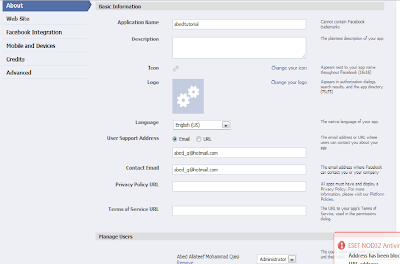
        so as many of you know already know the first step is to create facebook new application from the developer application as you can see in the picture below :

        • when you click setup new application you need to choose your application name and agree the facebook terms ( I choose facetalk) .
        • after your application is created you must know the most important parameters in order to connect with facebook ( API key, application ID, application secret ) .
        • now click the setting and go to the website tap and fill the site url with your application folder URL so for me i fill it with : http://amazingwork.com/amazingtalk/ so i hosted my files inside amazingtalk folder and in the site-domain just fill it with your domain : amazingwork.com .
        • then click the facebook integration tap and now you need to fill the convas url and this is the main URL for your application and every body will access your application thru this URL so for our example I fill it with amazingtalk becuase facetalk is already taken, and in the convas Type please be sure to select Iframe because your application is not related to facebook compiler, u can use any java script , you are not forced to used FBL tags ). finally choose Auto-resize in the iframe size .
        at this stage we finish creating our application setting ;) now we will start Writing our code to connect with facebook.

        as i found in my research that facebook keep upgrading their code and release new versions of API to allow users to connect with the facebook, so in this tutorial we will connect with facebook using the graph API which the latest version of facebook API.

        so since we will use Flash AS3 to connect with facebook you need for sure to install the graph API as3 libraries to connect with facebook, so please click this link below to download this graph API.


        after you installed the graph ApI, go to flash cs5 and create new flash AS3, then go to file-->action script setting, then as you can find in the picture below click the + sign and choose the GraphAPI Web_1_0.swc as you can find in the .rar file .

        now flash will recognize all the facebook classes .

        P.S: if you need to create a desktop version please be aware to download the desktop version from google code :
        this will help you to test your API in offline mode before converted to the web version.
        also you can download the whole documentation from the google code aslo.

        now to make it easy for u i have created simple single tone class that handle the connection with facebook thru flash itself also u can use a java script  to handle the connection :

        you can find the code of this class in the source files link in the bottom of this tutorial, so to use this class you need only to copy and paste it in your .fla folder, and then from any place you need to use this class functionality you can write this code :

        var oFaceBookConnector:FaceBookConnector = FaceBookConnector.GetFaceBook(Trace_txt);
        oFaceBookConnector.APKey = "b1762000d69544ebef65396dfe4a297a"
        oFaceBookConnector.APPID = "181390918539668"
        oFaceBookConnector.ReDirectURL ="http://amazingwork.com/fbexampletest/index.html"
        oFaceBookConnector.addEventListener("Connected",onFaceBookConnectHandler)
        oFaceBookConnector.Connect()
        function onFaceBookConnectHandler(e)
        {
        Trace_txt.text = "Connected"
        UserID_txt.text = oFaceBookConnector.UserInfo.UserID
        }


        the Trace_txt is only for testing purpose and you can remove it when you finish your testing.
        so as you can notice first of all i get the instant of the facebook object , then i set the importent properties i need to connect to facebook ( APkey, APPID, redirect URL - i use this url to set the permition for the first time user connect to my application)
        also i created a custom event to know when my application successfully connected to the facebook .


        after we publish the swf  then you need to establish the connection using facebook Javascript graph API, and this can happens using any server pages ( PHP,ASP.net) or even an HTML page .


        so after you publish the SWF and HTML page you need to modify the HTML page to connect with facebook.


        first of all copy this code in your header tag :
        <script type="text/javascript" src="http://connect.facebook.net/en_US/all.js"></script>
        <script type="text/javascript">
            function SetPermissions(ReDirectURL) { 
               top.location.href = ReDirectURL;
               
            }
        </script>


        in the  body tag and before your SWF object you need to reference to the facebook java script bridge :
        <script type="text/javascript" src="FBJSBridge.js"></script>


        so by this you finish all itis need to connect to facebook :)
        ----------------------------------------------------------------------
        you can download all you need by follow this link below :


        Source Files
        Online Demo

        if you have any question please feel free to contact me : abed_q@hotmail.com


        Create facebook Iframe Application Using flash AS3 API ( Updated Version ).

        please like and post your questions :  http://www.facebook.com/pages/FlashCS5-Tutorials/176320862386436 After I have received a lot of requ...